An easy-to-use file explorer!
XnView is one of the most popular file explorers for converting and viewing a wide range of image files. The platform comes with a built-in preview engine, allowing crystal clear display of more than 400 image formats. Unlike competitors like FastStone Image Viewer, XnView lets you play different media formats, such as MP3 and AVI. Since the software looks similar to the native Windows Explorer, it’s easy to use and navigate for beginners.
Top Recommended Alternative

A download worthy free tool!
XnView comes with a wide range of tools to view, edit, and organize your images. With an intuitive and convenient interface, the program runs and loads quickly without lags or crashes. Whether you want to put together a presentation for work or organize pictures from a favorite vacation, XnView allows you to manage these tasks promptly and easily.
How many file formats does XnView support?
While programs like IrfanView and Fotosizer come with similar features, XnView supports a wide range of formats. With the smooth and intuitive interface, it displays large video files without disruptions. At times, the program doesn’t recognize some files. In most cases, this happens when the file’s extension has been changed. If you face such issues, the program includes a ‘Help’ file, which solves issues promptly.
Another aspect of the program that didn’t work well was the lack of recognition for some native file formats. For instance, a text file with ‘LOG’ extension isn’t treated as the same file with a ‘TXT’ extension. While it’s a small issue, it stands out because of the usual high-quality capabilities of the program.
Does XnView have an intuitive interface?
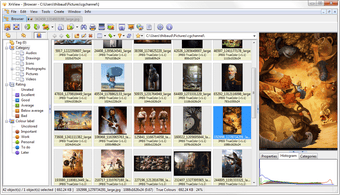
As mentioned earlier, XnView comes with an intuitive interface. As such, everything on the screen is laid out nicely, with specific columns to browse files easily. On the left-hand side of the screen, you’ll notice all the directories listed with detailed content and information. Once you select a file, it brings up a preview in the window’s lower half.
If you’re using Xn Viewer free download to browse through photos, you can create a slideshow, which can run in full-screen mode. On the other hand, while browsing through INI or TXT files, the opening description in the form of the text shows up as an icon. It allows you to view the entire content of the file in the preview window.
Similarly, when you choose a folder to view contents, the program displays thumbnail images in the main window. Additionally, you can see detailed information, such as resolution, file type, etc.
While using XnView, you don’t need to use any other file explorer. It’s worth mentioning that XnView is available in the form of a ‘pocket-sized’ program called XnView Portable. It can be saved on a USB stick to be used with Windows laptops and desktops.
What are XnView’s features?
While using this simple and easy-to-use program, you can take advantage of several filters, effects, and other features. Some of the most commonly used features include rotation, cropping, gamma, brightness, balance, and more. In fact, XnView supports batch processing and lets you convert files with multiple output options, including PNG, JPEG, CIN, PCX, ICO, WIA, EXIF, TIFF, GIF, IPTC, and BMP.
As an add-on, XnView free download provides you with a handy ‘Screen Capture’ tool, which allows you to customize output resolution for thumbnail images. When you open the program for the first time, it provides you with a set of tips and instructions. There’s also a ‘Help’ file, which can be accessed via a hotkey. With the FAQ page and forum, you can seek help for any issues related to image viewing or conversion.
XnView's full download version includes a wide range of tools to view, edit, and organize your photos. Moreover, the program comes with an intuitive and easily understandable interface. Whether you want to organize photos or create slideshows for work, the program helps you do anything you need with an efficient file explorer.
The perfect file explorer for beginners!
Compared to HoneyView and other similar programs, XnView download comes with a comprehensive set of features and tools for editing and managing digital images. Since the program comes with an intuitive interface, even beginners can use it without much trouble.
While casual users won’t need advanced features, XnView is a great choice for anyone interested in organizing digital images. Since it’s completely free, it’s good enough reason to download and try XnView for Windows. Region-specific options are available, such as XnView India, XnView Korea, XnView Japan, etc.
This program is Windows 11 compatible.